Intercom + NetSuite
Your support team shouldn’t have to leave Intercom to answer a billing question. The Intercom–NetSuite integration connects your customer support and financial data automatically, giving customer-facing teams a complete view of every account without switching tools. Customer, contact, and order information stays in sync in both directions, so reps spend less time hunting for answers and more time helping clients.
Intercom NetSuite Integration Key Features
- Two-way contact sync between NetSuite and Intercom, so support, sales, and success teams always see up-to-date contact names, companies, and phone numbers no matter which system the info was entered in.
- Automatic company sync from NetSuite to Intercom — every NetSuite customer record becomes a Company in Intercom, complete with website and industry, so conversations are instantly attached to the right account.
- Invoices, credit memos, and sales orders visible directly in Intercom, so reps can see a customer’s billing and order history without ever leaving the Intercom Inbox or Messenger.
- A purpose-built, read-only Sales App inside Intercom that gives customer-facing teams a clear, safe snapshot of NetSuite financial data with zero risk of accidental edits to source records.
- Context-aware record display that automatically shows the Sales Orders, Invoices, and Credit Memos tied to whichever Company or Contact is open, so reps get relevant answers in seconds.
Why It Matters
- Faster resolutions: reps get billing and order context instantly, without submitting a request to another team.
- Fewer errors: automatic syncing keeps customer and contact records consistent across systems, reducing manual data entry.
- Better visibility: sales and success teams see the full financial picture of an account right where conversations happen.
- Safe by design: the read-only Sales App means NetSuite stays the single source of truth for financial data.
How the Sync Works
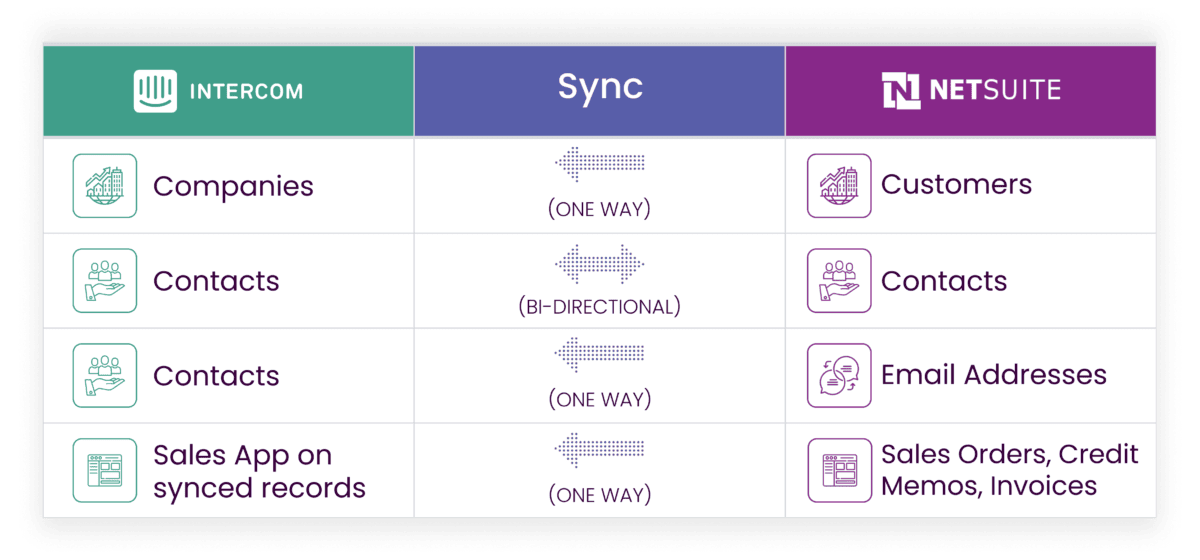
Customer records created in NetSuite automatically appear in Intercom as Companies, carrying over key details like company name, website, and industry. Contact information (names, phone numbers, and company associations) stays synchronized in both directions, so updates made in either system are reflected in the other, and email addresses flow from NetSuite into Intercom to keep contact records accurate.
Sales Orders, Invoices, and Credit Memos are pulled into a dedicated view inside Intercom for any Company or Contact that has already synced over, giving teams instant access to a customer’s transaction history alongside their support conversations.
FAQ
Does Intercom integrate with other CRMs besides NetSuite?
Yes. Faye also built an Intercom CRM integration with Sugar, syncing contacts, companies, and support conversations between the two platforms.
Does NetSuite integrate with other CRMs?
Yes. If your team uses Sugar alongside NetSuite, see our NetSuite CRM integration with Sugar for the same kind of two-way sync between financial and CRM data.
Will this integration change or edit my NetSuite data?
No. The Sales App inside Intercom is read-only, so NetSuite remains the single source of truth for all financial records.
Is this a real-time integration?
Yes. Updates to contacts, companies, and financial records sync automatically between NetSuite and Intercom as they happen, so reps are always working from current information without needing to manually refresh or wait for a scheduled batch update.
Which company does NetSuite integration best?
There’s no single answer that fits every business, since the right integration partner depends on which systems you’re connecting and how deep the sync needs to go. What sets Faye apart is that we build and support integrations across the full stack a mid-market or enterprise team actually runs (NetSuite alongside Sugar, HubSpot, Salesforce, and support platforms like Intercom) rather than a single point solution. That means one partner who understands both your CRM and your financial systems, instead of stitching together vendors who don’t talk to each other.
Find out more about this Integration
Software by FAYE