Elevate your revenue operations
Where Sales Magic Meets Financial Efficiency
The Pipedrive QuickBooks Integration by Faye bridges the gap between your sales and finance teams. This powerful QuickBooks integration automates key processes, reduces manual data entry, and keeps your CRM and accounting data aligned.
Through the Pipedrive integration with QuickBooks, your sales team gains real-time insights within the CRM they rely on every day. With a full view of customer interactions and financial history, you’ll boost operational efficiency, streamline workflows, and elevate your customer experience.
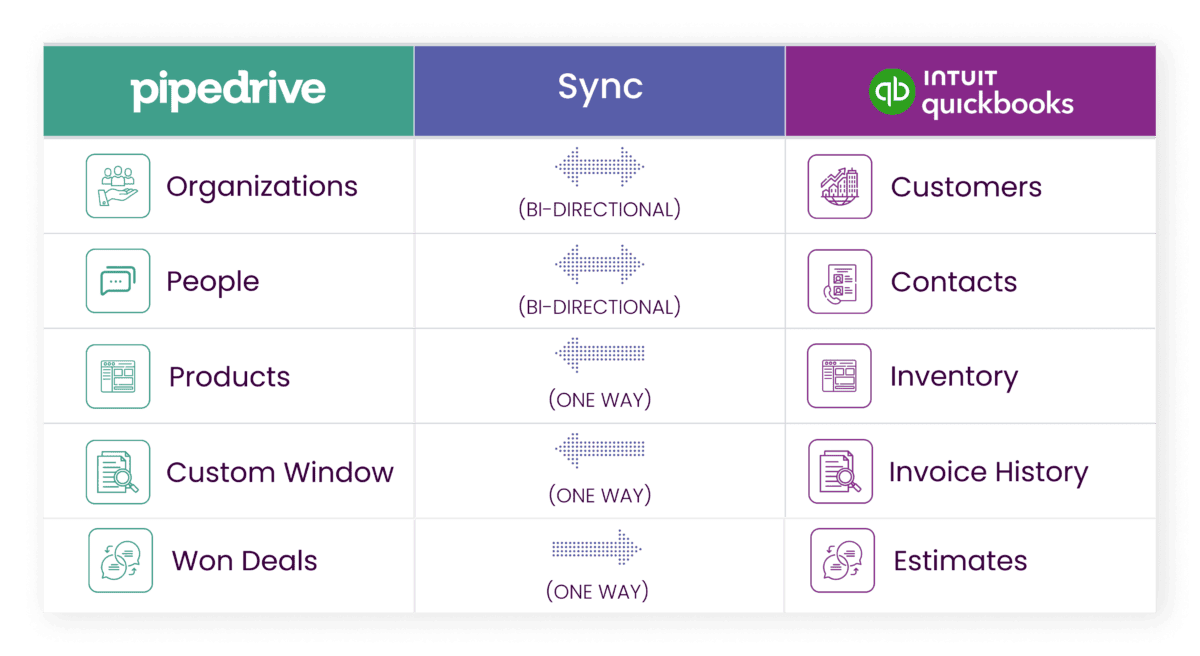
Pipedrive QuickBooks Integration: Key Benefits
- Full Team Data Sync Capability: Unlike other integrations, Faye’s solution allows all Pipedrive users to sync data with QuickBooks, enabling broader team access and collaboration across departments.
- Comprehensive Invoice History: Sync and view all invoices from QuickBooks—not just those generated from Deals—under the organization record in Pipedrive, giving your team complete financial visibility.
- Bi-Directional Customer Sync: Keep customer, organization, and contact details consistent across Pipedrive and QuickBooks, ensuring data accuracy in both systems.
- Real-Time Inventory Insights: Provide your sales team with live QuickBooks inventory data within Pipedrive, enabling them to present accurate product information and pricing in every interaction.
- Seamless Deal Conversion: Automatically convert closed-won deals in Pipedrive to estimates in QuickBooks, streamlining the transition from sales to finance.
Requirements
- Active Pipedrive and QuickBooks Online accounts are necessary to use the Pipedrive integration with QuickBooks. New to Pipedrive? We’ll help you get started!
Find out more about this Integration
Software by FAYE


Frequently Asked Questions
Does Pipedrive integrate with QuickBooks?
Yes, Pipedrive does integrate with QuickBooks through the Pipedrive QuickBooks integration, which is available for companies using QuickBooks Online. This Pipedrive integration with QuickBooks by Faye lets teams integrate Pipedrive deals, contacts, and organizations with QuickBooks customers, invoices, and inventory without pasting data manually between systems.
What are the key benefits of Pipedrive QuickBooks integration?
Key benefits include full team data sync capability, comprehensive QuickBooks invoice history inside Pipedrive, bi-directional customer sync, and real-time inventory insights. These features improve data consistency, streamline business processes, and support better sales performance, revenue forecasting, and financial management.
How does the Pipedrive QuickBooks integration help with creating invoices?
The integration allows sales teams to automate invoice creation by converting closed-won Pipedrive deals into estimates or QuickBooks invoices, reducing manual errors and duplicate data entry. Teams can view invoices created in QuickBooks, check invoice status and due date, and access invoice number and invoice details from the related organization or deal detail view in Pipedrive.
Can I see all QuickBooks invoices inside Pipedrive?
Yes, this QuickBooks integration syncs all invoices from QuickBooks—not just invoices created from Pipedrive deals—under the organization record in Pipedrive. This gives a complete QuickBooks invoice history and corresponding invoice information for each existing customer directly in your CRM.
How does this QuickBooks integration handle customer and contact data?
The Pipedrive QuickBooks integration uses bi-directional customer sync so customer, organization, and contact details remain consistent in both systems. This reduces manual updates, keeps customer tax ids, addresses, and other key data types aligned, and supports accurate accounting processes and business operations.
Does it sync inventory and product data?
Yes, the Pipedrive integration with QuickBooks provides real-time inventory insights by syncing QuickBooks inventory data with Pipedrive so sales teams can see current product availability and pricing. This helps reps adjust quantities accurately, quote with confidence, and support higher sales efficiency and improved cash flow management.
How does it support sales and accounting processes?
By integrating Pipedrive and QuickBooks, the integration connects sales process stages, Pipedrive deals, and QuickBooks invoices so financial processes and accounting processes follow seamlessly after a deal is won. This connection between CRM and accounting software improves data synchronization, reduces manual errors, and enables automated workflows from deal close to invoice creation and payment statuses.
What do I need to use the Pipedrive integration with QuickBooks?
You need active Pipedrive and QuickBooks Online accounts to use the Pipedrive QuickBooks integration. Once those are in place, the Faye team can support integration setup, help configure integration preferences, and ensure app access is correctly connected to your Pipedrive marketplace account and QuickBooks account.
Is there a limit on which users can sync data?
Unlike some other QuickBooks integration options, the Pipedrive and QuickBooks integration allows all Pipedrive users to sync data with QuickBooks. This supports broader collaboration across departments so sales, finance, and operations teams share the same financial data, invoice statuses, and sales volume insights.
How does this Pipedrive QuickBooks integration impact reporting and revenue forecasting?
Because the integration centralizes financial data and QuickBooks invoices in Pipedrive, it gives better visibility into sales receipt history, average deal size, and overall sales volume. This improved data consistency supports more accurate revenue forecasting, sales performance tracking, and financial management for the business owner and leadership team.