
Artificial intelligence has finally reached the point where it is driving real operational impact. However, as organizations begin investing in new AI tools, many struggle to integrate them with existing customer relationship management and CX systems.
Integrating AI into business systems can create both technical and structural bottlenecks. Modern AI solutions depend on clean customer data and consistent context. When those underlying systems aren’t aligned, AI can create more problems than it solves.
However, when AI is embedded directly into CRM and CX environments, businesses can see improvements across the board. For most organizations, this can lead to streamlined operations, improved customer service, and new levels of operational efficiency by showing how AI enables businesses to operate with greater speed and insight.
This article explores how organizations can safely integrate AI systems into their existing infrastructure. Along the way, we’ll look at common integration mistakes, best practices for integrating AI into business models, a phased framework for implementation, and a real-world example using Faye’s Agent Builder for SugarCRM.
Why the Right Integration Matters
Successfully implementing artificial intelligence (AI) requires both choosing the right AI tools and ensuring these tools work seamlessly within your existing systems. When organizations rush into integrating AI into business workflows without proper alignment, the result is often fragmented processes and inconsistent customer data.
Modern systems and AI algorithms rely on context. They need access to the right records and data relationships to produce accurate insights. If your CRM and CX platforms aren’t structured to support this, even advanced artificial intelligence can overlook critical signals in customer behavior.
On the other hand, when AI is implemented with the right strategy and structure, it becomes a powerful driver that can solve business problems. When integrated correctly, companies can leverage AI to enhance decision making, improve customer service, and give teams actionable insights they need to move faster and stay ahead of market trends.
What Most Businesses Get Wrong About AI Integration
Even with growing enthusiasm for AI tools, many organizations struggle to implement them effectively. The challenge rarely comes from the technology itself, it comes from the way it’s introduced into the existing ecosystem.
These issues show up across organizations of all sizes, from startups to large firms. Here are the most common mistakes companies make when integrating AI into business operations.
Adding AI Without Architecture or Governance
When individual teams adopt their own tools, shadow IT becomes inevitable. For a large enterprise or a small business owner, introducing AI without guardrails creates the same risks: conflicting workflows, duplicated data, and unpredictable automation.
Without guardrails, even simple machine learning features can create unexpected risks – especially when ai powered capabilities begin to automate or handle complex tasks.
Connecting Systems at the UI Level Instead of the Data Level
Many businesses “integrate” AI by linking interfaces rather than data. On the surface, these tools appear connected. However, the AI still lacks access to the right customer data, historical context, or market trends and market research. This limits its ability to help teams make informed decisions and deliver valuable insights.
Ignoring CRM & CX Context
AI agents need full visibility into accounts, conversations, and customer behavior. When context is missing, artificial intelligence may generate incomplete recommendations or automate the wrong repetitive tasks. This can both limit impact and erode customer trust.
Tools That Don’t Respect Permissions or Role-Based Access
Some AI platforms pull large volumes of data without considering role-based visibility. For technical leaders and information technology teams, this is a major red flag.
Enterprise-ready AI must honor permissions to avoid surfacing harmful content or sensitive information. Without this structure, using AI to automate processes or support strategic work becomes risky.
Assuming Native AI = Fully Integrated AI
Just because a CRM or CX platform includes “built-in AI” doesn’t mean it’s deeply integrated. Many native tools only summarize text, operate like an AI chatbot, or automate simple routine tasks. True integration requires AI agents that work at the data level to improve efficiency across key areas of the business.
Best Practices for Integrating AI Into Business Models
Integrating AI systems into existing operations requires a disciplined approach rooted in strategy, governance, and alignment. These best practices help ensure that integrating AI into business models leads to meaningful, scalable impact.

Start With the Use Case
Successful AI adoption begins with a clear understanding of business needs. AI should be used to fill operation and skills gaps. For example, an e-commerce company might focus on reducing delays in order processing or improving response times.
Avoid chasing the latest AI technology. Instead, identify specific problems such as bottlenecks in data entry, gaps in supply chain efficiency, or tasks that take teams away from higher-value creative work.
Map AI to CRM and CX Data Models
Effective AI depends on clean, connected customer data. Ensure that when integrating AI into business systems, it has access to the right modules and activity history within your CRM and CX platforms.
Whether the goal is to automate repetitive tasks, analyze customer behavior, or enhance decision making, aligning AI with your existing data model prevents errors and enables more accurate predictive analytics that support strategic decisions.
Build Governance, Guardrails, and Permissions Upfront
When integrating AI into business, it must operate within a controlled framework. Establish role-based access, engage in risk management, and set boundaries to prevent the generation of harmful content. Governance ensures that artificial intelligence supports compliance requirements and preserves customer trust
Guardrails also help prevent sensitive information or intellectual property from being surfaced in the wrong context.
Choose the Right LLM for the Task
Not all language models excel at the same things. Some perform better at analyzing patterns, while others (especially generative AI models) are stronger at deeper reasoning or generating high-quality content creation.
Match the model to the specific workflow. Selecting the right LLM ensures better accuracy and aligns AI performance with your core business objectives.
Monitor and Continuously Refine Outputs
AI is not a “set it and forget it” solution. Regularly evaluate accuracy, performance, and relevance. This may include updating prompts, adjusting parameters, or refining algorithms as workflows evolve.
UNLOCK YOUR FREE 1-HOUR AI CONSULTATION
Discover how AI can transform your business with a personalized session tailored to your goals. This 1-hour consultation dives into practical ways to elevate customer experience, operations, and ROI.
- Identify high-impact AI use cases for your business
- Explore tools to optimize CX, lead flow, and revenue
- Get expert insights on automation and AI strategy
 Book Your Consultation
How to Align AI With Your Existing CRM & CX Stack
Most organizations already rely on their CRM and CX platforms as the system of record, which means AI must operate within those environments. When AI runs off-platform or depends on disconnected data sources, it creates inconsistent outputs.
Effective alignment begins with data. AI needs access to accurate customer data and the right relational context to generate meaningful insights. Without this foundation, even advanced artificial intelligence struggles to deliver useful recommendations.
Placement also matters. When integrating AI into business, it should appear where teams already work. This might include inside customer relationship management dashboards, record views, and support interfaces. This reduces context switching and ensures that AI-generated materials are immediately actionable.
Finally, alignment requires clear rules around visibility and access. Role-based permissions, guardrails, and filtering logic help ensure AI provides relevant information. When these elements are handled correctly, organizations can deploy AI in a way that strengthens their existing stack.
The Phases of AI Integration
Integrating AI into business systems successfully requires a phased approach that minimizes disruption and ensures each step supports long-term scalability. The following framework helps organizations align AI with their existing CRM and CX stack.
Phase 1: Assessment & Mapping
Start by reviewing current workflows, data structures, and business needs. Identify where automating routine tasks or improving decision making can create the most impact. Your goal should be to identify time consuming tasks that AI can help eliminate.
Phase 2: Prioritize High-Impact Use Cases
Select one or two use cases with clear value. These might include areas like analyzing customer behavior, generating actionable insights, eliminating repetitive tasks. or forecasting inventory management.
Phase 3: Build & Configure
Configure the AI to match the workflow. This includes selecting the appropriate model, defining prompts, setting guardrails, and determining where the AI will appear inside the CRM or CX platform to support workflows and automate tasks reliably.
Phase 4: Test & Validate
Evaluate output accuracy, relevance, and safety. Confirm that role-based permissions work correctly and that no harmful content or sensitive data is surfaced. Testing ensures the AI operates reliably within your existing environment.
Phase 5: Deploy & Train
Roll out the AI gradually so teams can adjust their workflows and it supports ongoing professional development. Training helps employees understand how to use the system effectively, improving adoption and supporting long-term success.
Phase 6: Monitor & Scale
Monitor performance, refine prompts, and expand usage. As workflows mature, add new tasks, teams, or models. Continuous improvement helps organizations stay ahead and maximize the value of AI over time.
FAB for SugarCRM: What Proper Integration Looks Like
Most integration challenges come from AI tools operating outside the systems where teams actually work. Faye’s Agent Builder (FAB) for SugarCRM is a strong example of what happens when AI is embedded directly into a CRM platform rather than bolted on from the outside.
By aligning AI with existing data, workflows, and permissions, FAB shows how organizations can deploy AI systems without disrupting their stack.
What FAB Is and Why It Solves Integration Problems
FAB allows organizations to build custom AI assistants directly inside SugarCRM using a point-and-click interface. Each assistant is tailored to a specific workflow which can:
- Summarize records
- Analyze opportunities
- Draft communication
- Generate actionable insights from real-time data.
Because the AI operates inside Sugar, it works with accurate customer data, established processes, and the CRM’s existing structure.
Custom Behavior and Role-Specific Agents
Instead of relying on generic AI, FAB supports specialized agents such as Account Battle Plans, Lead Battle Plans, and Prospect Researchers. These agents pull from multiple Sugar modules and web sources to deliver summaries, next steps, sentiment analysis, and tailored outreach.
Deep Context Through Modules, Look-Back Windows, and Web Data
FAB gives teams full control over what information the AI uses: specific modules, historical ranges, and external sources. This prevents the common issue of AI analyzing stale or irrelevant data and helps teams maintain accuracy as their records evolve.
Placement Inside the Workflow
Outputs from FAB appear directly in Sugar’s native preview pane, dashboards, and record views. By bringing AI into the same screens where users already spend their time, FAB reduces context switching and keeps AI-generated recommendations immediately actionable.
Governance, Permissions, and Guardrails
FAB respects SugarCRM’s role-based visibility, field-level restrictions, and administrative controls. Guardrails and filtering ensure the AI avoids exposing sensitive data or generating harmful content.
AI-Powered Meeting Insights For Your Sales Pipeline
Each AI request displays a live status log, showing retrieval steps, timestamps, and model outputs, which helps technical teams validate accuracy and troubleshoot issues quickly.
Many teams also pair CRM-embedded AI with conversation-intelligence tools like Spiky.ai, which extract insights from calls, meetings, and support interactions. Combined with FAB’s structured CRM context, these insights create a more complete AI ecosystem.
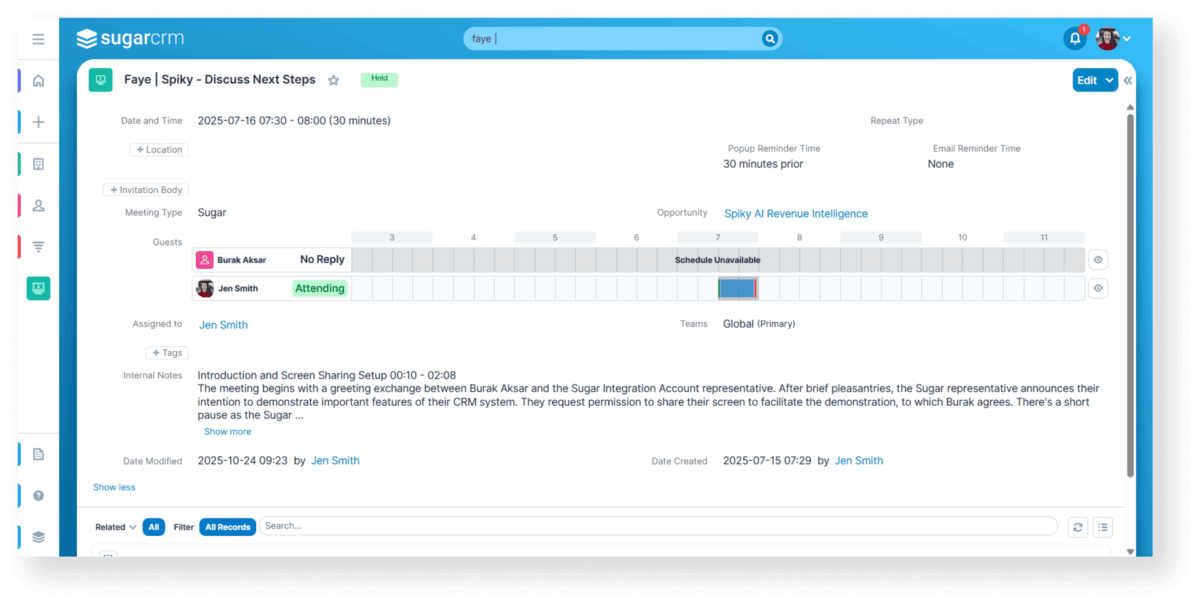
Integrate AI-powered meeting insights directly into your sales workflow with the Spiky.ai Integration for SugarCRM. This tool automatically syncs summaries, next steps, and crucial customer intelligence into Sugar. By eliminating manual data entry, your team gains real-time visibility into account health and deal progress, allowing them to concentrate on strengthening relationships and driving sales. Key features include:
- Automated Meeting Sync: Automatically creates and updates SugarCRM meeting records, linking calls from Google Meet, Teams, and Zoom to the relevant account, contact, and opportunity.
- AI-Generated Summaries & Action Items: Enriches each call with summaries and next steps, stored in Sugar’s internal notes.
- Real-Time Status Updates: Instantly updates meeting statuses and opportunity fields for accurate pipeline data.
- Custom Fields: Uses “Spiky Summary” and “Spiky Score” fields to capture sentiment and quality metrics.
- Pipeline Intelligence: AI-driven insights identify opportunities, spot stalled deals, and guide reps to actions that close sales.
- Future-Ready Architecture: Currently uses a Zapier connector, with a native SugarCRM app coming soon.
- Record Updating: Automatically updates fields like BANT, Next Steps, and custom fields in SugarCRM based on call content.
Business Outcomes
With AI embedded directly in SugarCRM, teams can streamline workflows and improve consistency across sales, support, and marketing. The result is practical, measurable operational efficiency without adding risk to the existing tech stack.
Conclusion
In modern operations, AI plays a crucial role in helping teams solve problems quickly. When organizations use the right tools and align AI with their existing architecture they enable AI to deliver its full operational value
A structured approach to implementing AI turns alignment into a competitive advantage that improves business decisions, and generates consistent, actionable insights across the organization.
For technical leaders, integrated AI is a defining capability. Companies that connect AI directly to their CRM and CX environments will outperform those relying on disconnected tools.
Faye’s Agent Builder for SugarCRM shows what this level of integration looks like in practice. If you’d like to explore how this approach can strengthen your AI strategy, you can see more details about the solution below.
Learn More About the Integration


Most companies are getting pretty good at buying AI. They're getting much less good at turning it into meaningful change. Read more

AI technology is transforming at an exhilarating rate. The impact and ROI it delivers to organizations, less so, stymied by Read more

AI governance consulting, for a Claude rollout, means turning ad hoc AI use into a deployment with defined identity controls, Read more

Why the smartest people in the room weren't talking about smarter AI — they were talking about cleaner CRMs. London Tech Week Read more