Zendesk and Pipedrive Integration: Where Sales Meets Support


Zendesk Pipedrive Integration
The Zendesk Pipedrive Integration by Faye brings the features you love about Zendesk and Pipedrive into one platform. Users can now effortlessly sync Organizations and Contacts across both platforms, ensuring sales and support always work from the same customer data. View Zendesk tickets inside Pipedrive and Pipedrive deals inside Zendesk, giving teams full visibility into every interaction. Through the Pipedrive Zendesk integration your organization unlocks a seamless, unified customer experience that drives efficiency and stronger relationships.
Zendesk Pipedrive Integration: Key Features
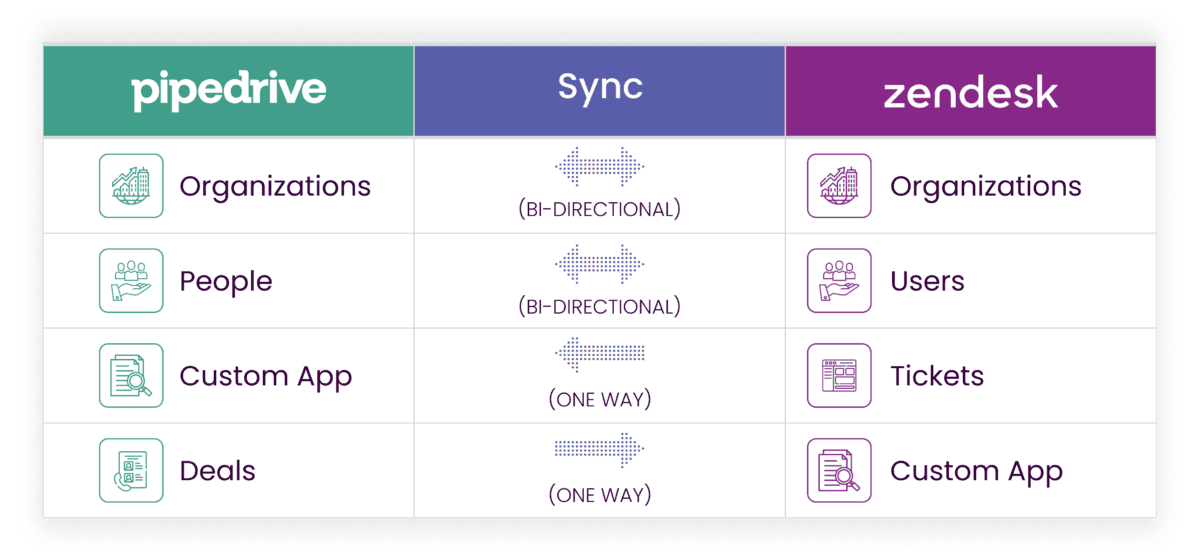
- Company Sync (Pipedrive Organizations ↔ Zendesk Organizations)
- Organizations created in one system automatically sync to the other system.
- Keep company records aligned across sales and support.
- Syncs key details like name, domain, phone, and notes.
- Contact Sync (Pipedrive People ↔ Zendesk Users)
- Contacts created in one system automatically sync to the other system.
- Unified customer view: sales and support always see the same people.
- Syncs names, emails, phone numbers, job titles, and linked company.
- Tickets in Pipedrive (Zendesk → Pipedrive Custom App)
- View Zendesk ticket information directly inside Pipedrive.
- See ticket number, subject, status, priority, requester, assignee, and last update.
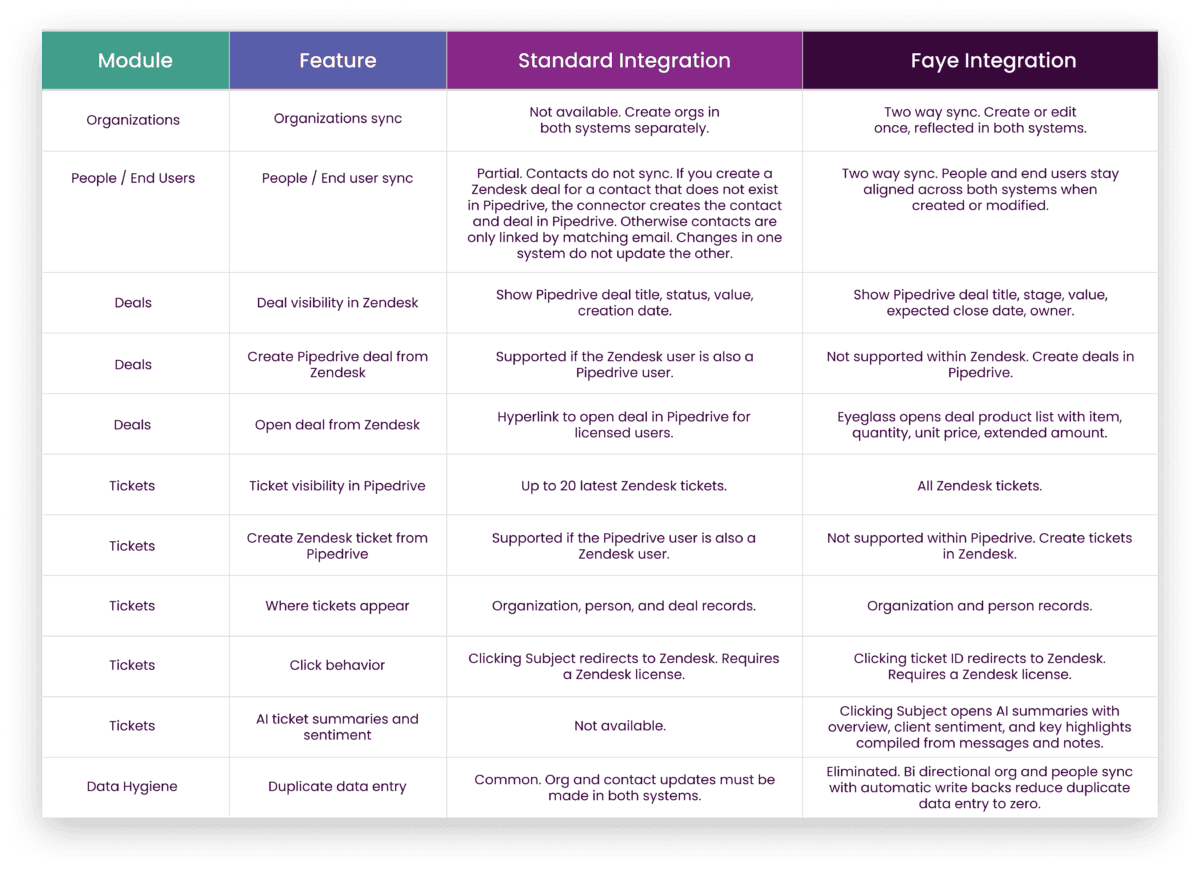
- AI-powered Ticket Summaries with an overview, customer sentiment, and key highlights compiled from Zendesk messages and notes.
- Deals in Zendesk (Pipedrive → Zendesk Custom App)
- View Pipedrive deal information directly inside Zendesk
- See deal name, value, stage, expected close date, and owner/sales rep.
Key Benefits
For Sales Teams
- Customer Health at a Glance: See open issues before reaching out, improving conversations and upsell opportunities.
- Faster Collaboration: No need to chase down support as key ticket details are right in Pipedrive.
- Informed Deals: Understand the full support history of a customer before closing or renewing deals.
For Support Teams
- Context-Rich Support: Automatically see sales info like company details and account owners in Zendesk.
- Smarter Prioritization: Know which tickets come from high-value customers.
- Reduced Manual Work: Fewer “who owns this customer?” questions thanks to synced companies and contacts.
For the Business
- Eliminate Data Silos: Sales and support stay on the same page.
- Happier Customers: Faster, more personalized service builds loyalty.
- Increased Efficiency: Less manual entry, fewer errors, more time for meaningful work.
Requirements for the Pipedrive Zendesk Integration
- Our software is fully compatible with all currently supported versions of Pipedrive and Zendesk, ensuring a smooth and efficient experience for your organization.
Pricing
- $2,499/year + one-time setup fee
Find out more about THe Zendesk Pipe Integration
Software by FAYE





Frequently Asked Questions
How does integrating Zendesk with Pipedrive improve daily work for sales and support?
By integrating Zendesk with Pipedrive, support agents can access Pipedrive customer information (companies, deals, owners) directly in their Zendesk account, while salespeople can see support tickets linked to their deals and contacts. This reduces manual data entry, speeds up customer communication, and helps both teams prioritize work based on ticket status and deal value.
What data syncs between Zendesk and Pipedrive?
The Zendesk and Pipedrive integration syncs Organizations and Contacts across the two platforms, so company and contact details stay aligned. Company records (name, domain, phone, notes) and contact details (email, phone, title, linked company) are kept in sync, giving users a complete view of the customer without jumping between systems.
Can I see Zendesk support tickets inside Pipedrive?
Yes. With this native integration, Zendesk tickets appear inside Pipedrive so users can quickly create tickets and see support ticket details without leaving the CRM. You can view information like ticket number, subject, status, priority, requester, assignee, last update time, and ticket tags directly from the relevant Pipedrive activity, deal, or organization.
Can support reps see Pipedrive deals inside Zendesk?
Yes. Support agents can access Pipedrive deal information from Zendesk, including organization deal title, deal value, stage, expected close date, and owner. This helps support reps understand the status deal context while working on a support ticket and enables faster resolutions and better upsell or renewal conversations.
Does this integration automatically create new tickets or new deals?
The Zendesk Pipedrive integration is designed so users can seamlessly create tickets directly from Pipedrive and create deals directly from Zendesk. When support agents or sales reps connect Zendesk and Pipedrive, they can quickly create tickets or new deals from the other system, reducing clicks and manual data entry and enabling faster handoffs between teams.
How does the Pipedrive Zendesk integration help with faster resolutions and better customer communication?
Because support tickets and sales activities are visible across both platforms, support agents and sales reps share the same context about customer support requests and open deals. This shared view of customer information enables faster resolutions, fewer back-and-forth questions, and a more seamless customer experience across the full lifecycle.
Is this a native integration or does it rely on third-party tools?
Faye’s Pipedrive Zendesk integration is a native integration built specifically to connect these two platforms. It runs as custom apps inside both tools, so Pipedrive users see Zendesk data in a Pipedrive activity panel and Zendesk users see Pipedrive data in a Zendesk app window, rather than relying on generic third-party connectors.
What do I need to connect Zendesk and Pipedrive?
You need an active Pipedrive account and an active Zendesk account, along with the appropriate permissions and access in both systems. Once those are ready, the Faye team helps you integrate Zendesk with Pipedrive, configure your Zendesk domain, connect your Pipedrive account, and ensure users can access Pipedrive customer information and support tickets across the two platforms.
Can I use custom fields with this integration?
Yes. The Zendesk Pipedrive integration supports syncing key company and contact data and can be extended with custom fields to match your sales activities and support processes. Custom fields help keep status ticket creation date, last update time, and other important attributes visible in both systems so teams see the bigger picture for each new ticket or new deal.
How does the Zendesk Pipedrive integration support sales and support leadership?
By combining deal data and support ticket data in one connected view, leaders get a more complete view of the customer and of business operations. They can see how customer support requests relate to sales volume, deal value, and Pipedrive activities, helping them track performance, spot bottlenecks, and improve both the sales process and support workflows.